Move home folder to another partition
Notes
- keep in mind that most of this is me following this tutorial video, although it obvisouly falls apart at the end when I edit the fstab.
Install Gparted iso to USB stick in terminal! :0
- `sudo dd if=
- (make sure to unmount the USB Stick partition forst)
sudo umount {name of USB stick Partition}
- (make sure to unmount the USB Stick partition forst)
Move to Gparted with the boot menu with 1 command!! :D
sudo systemctl reboot --firmware-setup
Use ls -l
- Lost in the
lsblkmenu & don’t know where you are?- u can use
ls -l {name of partition}to inquire check the contents!
- u can use
tigergaj@bazzite:/var/home/tigergaj$ lsblk
NAME MAJ:MIN RM SIZE RO TYPE MOUNTPOINTS
sda 8:0 1 28.7G 0 disk
└─sda1 8:1 1 580M 0 part /run/media/tigergaj/GParted-live
zram0 251:0 0 16G 0 disk [SWAP]
nvme1n1 259:0 0 476.9G 0 disk
├─nvme1n1p1 259:1 0 600M 0 part /boot/efi
├─nvme1n1p2 259:2 0 1G 0 part /boot
└─nvme1n1p3 259:3 0 475.4G 0 part /var/home
/var
/sysroot/ostree/deploy/default/var
/sysroot
/etc
nvme2n1 259:4 0 931.5G 0 disk
├─nvme2n1p1 259:6 0 65.2G 0 part /run/media/system/root
└─nvme2n1p2 259:7 0 1K 0 part
nvme0n1 259:5 0 931.5G 0 disk
tigergaj@bazzite:/var/home/tigergaj$ ls -l /var/home
total 0
drwxr-xr-x. 1 tigergaj tigergaj 20 Dec 19 2024 linuxbrew
drwx------. 1 tigergaj tigergaj 812 Aug 27 15:07 tigergaj
tigergaj@bazzite:/var/home/tigergaj$
Use sudo mkdir
sudo mkdir /mnt/new_home
tigergaj@bazzite:~$ sudo mount /dev/nvme2n1p2 /mnt/new_home
tigergaj@bazzite:~$ lsblk
NAME MAJ:MIN RM SIZE RO TYPE MOUNTPOINTS
sda 8:0 1 28.7G 0 disk
└─sda1 8:1 1 580M 0 part
zram0 251:0 0 16G 0 disk [SWAP]
nvme1n1 259:0 0 476.9G 0 disk
├─nvme1n1p1 259:1 0 600M 0 part /boot/efi
├─nvme1n1p2 259:2 0 1G 0 part /boot
└─nvme1n1p3 259:3 0 475.4G 0 part /var/home
/var
/sysroot/ostree/deploy/default/var
/sysroot
/etc
nvme0n1 259:4 0 931.5G 0 disk
nvme2n1 259:5 0 931.5G 0 disk
├─nvme2n1p1 259:6 0 24.4G 0 part /run/media/system/root
└─nvme2n1p2 259:7 0 907.1G 0 part /var/mnt/new_home
/run/media/system/Home
U can see the new directory highlighted ⤴
Delete the lost & found folder
- It’s automatically generated when u resize a partition!
sudo rm -r /mnt/new_home/lost+found/
Move the files in ur current home to /mnt/new_home
sudo cp -r /home/. /var/mnt/new_home/- Wait a fkn long ass time if ur a freak
tigergaj@bazzite:~$ ls -l /mnt/new_home/
total 8
drwxr-xr-x. 3 root root 4096 Aug 27 18:50 linuxbrew
drwx------. 35 root root 4096 Aug 27 18:50 tigergaj
Use chown to change the owner of the folders
sudo chown -R tigergaj:tigergaj /mnt/new_home- wait a wacky amount of time
tigergaj@bazzite:~$ sudo chown -R tigergaj:tigergaj /mnt/new_home
[sudo] password for tigergaj:
tigergaj@bazzite:~$
tigergaj@bazzite:~$ ls -l /mnt/new_home/
total 8
drwxr-xr-x. 3 tigergaj tigergaj 4096 Aug 27 18:50 linuxbrew
drwx------. 35 tigergaj tigergaj 4096 Aug 27 18:50 tigergaj
- Notice how it says tigergaj tigergaj & not root root!! :)
Add the Partition UUID to the fstab
- u need 2 do dis so that this partition automatically mounts when ur system boots up! :D
- could do
sudo nano etc/fstab - I just went to dolphin, searched
/etc, then searchedfstab, & I edited it with Kate! - Next u need to find the unique UUID of the partition you made earlier!
sudo blkid /dev/nvme2n1p2- Don’t 4get that u can use
lsblkto look for which partition you added/mnt/new_hometo!
- Don’t 4get that u can use
tigergaj@bazzite:/var/home/tigergaj$ sudo blkid /dev/nvme2n1p2
[sudo] password for tigergaj:
/dev/nvme2n1p2: LABEL="Home" UUID="5f63a051-e8bd-441e-a740-46bfede9d65d" BLOCK_SIZE="4096" TYPE="ext4" PARTUUID="5eedfa10-02"
tigergaj@bazzite:/var/home/tigergaj$
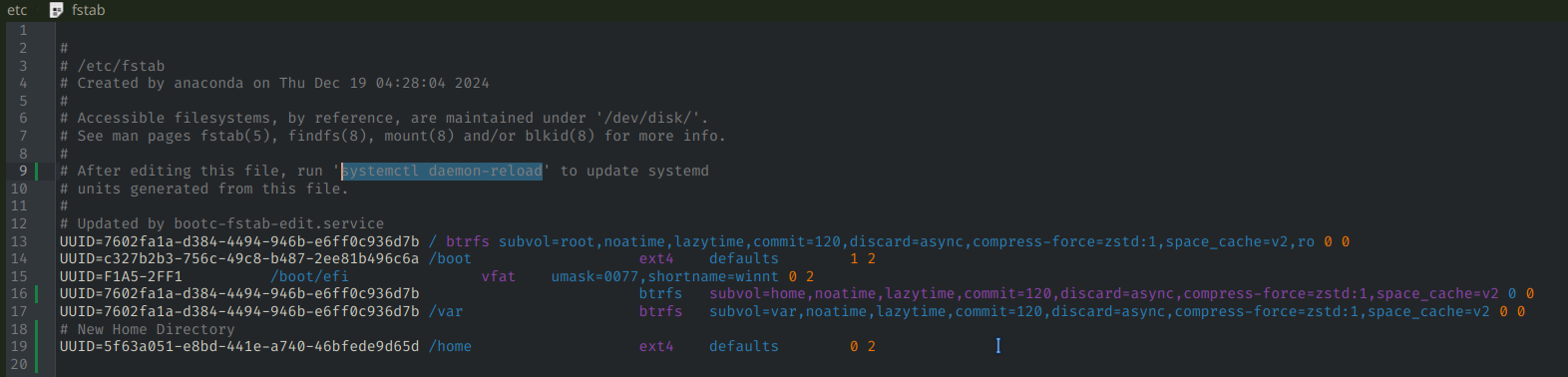
- Then run
systemctl daemon-reloadbecuz that’s what my fstab says to do!
The Switcheroo
- You still got the old
/homelayin’ around! gotta do smtn abt it!!
tigergaj@bazzite:~$ ls /
bin boot dev etc home lib lib64 media mnt opt ostree proc root run sbin srv sys sysroot tmp usr var
-
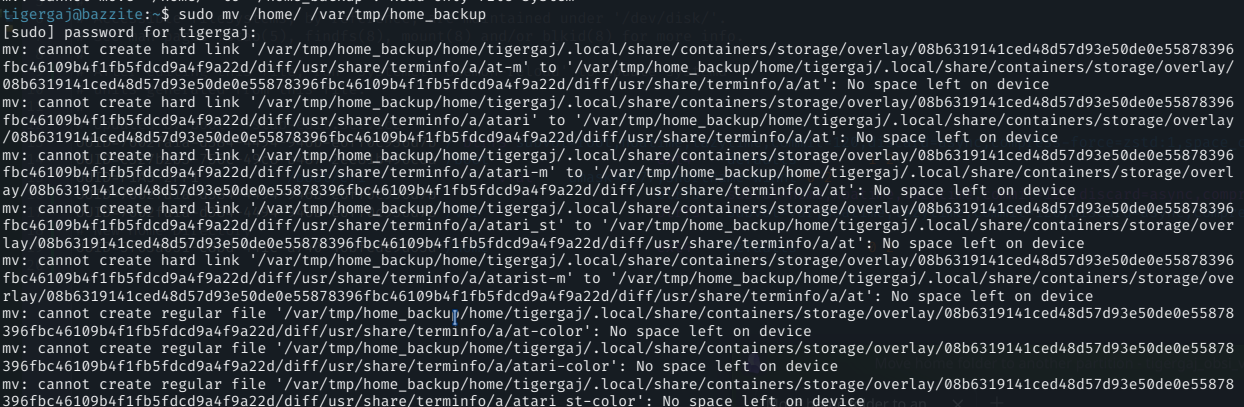
sudo mv /home/ /var/tmp/home_backup- wait a long ass time for this too
- wait nvm, don’t put it in tmp 🥴
-
uh oh
-
bazzite isn’t booting when I sign in
-
something is wrong :/
OKAY!!
TTY rescue mission
-
Since I’ve fucked around in my
/home/for a bit, I think I need to copy the home directory to a temp place again. - Drop to a TTY
lsblksudo blkid /dev/nvme2n1p2- then,
cd /etc/ nano fstab- add the new UUID, which should still be this:
5f63a051-e8bd-441e-a740-46bfede9d65d
I bricked my machine doing that
- Not sure exactly how, byeah.
- Fixed it using ’bruh moment’
Tutorials
Create Separate Home and Root Partitions on Linux Notes
Move Your Home Directory To A Second Drive Notes
How to move /home folder to another partition (Linux)